Answers to the questions we hear most often.
There's usually one of three perfectly normal reasons, not a bug: if the tracked content itself is currently empty (e.g. a hint text that only shows something under certain conditions), the row is correctly created with an empty source text - and stays empty in every language, since there's nothing to translate. As soon as the variable delivers a real value again, every language fills back in automatically.
If a tracked variable instead holds structured configuration/control data for another module rather than real display text (technically recognized as valid JSON, e.g. {"musicProvider":"CLOUDPLAYER"}), Simple Locale deliberately leaves it untouched: an automatic translation would re-encode quotes/special characters and thereby break the structure for the consuming script.
If every configured translation provider is currently paused (daily quota exhausted, rate limit) or a single translation attempt failed, a cell that has never been filled yet stays empty temporarily and gets caught up automatically as soon as a provider is available again.
If instead you want to translate text that isn't a Symcon variable in the tracked tree at all - say, because it's generated directly in the PHP code of your own tile or your own script - it logically never shows up in the tables in the first place. That's exactly what the SLOC_TranslateExternalText() PHP command is for, called directly from your own code - see the documentation.
Yes: every row in the scanned translation tables (object names, custom texts, Automations, Greeting, enumerations, charts) has a "Translation active" checkbox - switch it off for a row and that text stays in the original language everywhere, e.g. for proper nouns, brand names, or technical abbreviations. It also stops costing a translation call.
Part of the Pro edition (the same checkbox column as direct cell editing). An already-set deactivation keeps working even after a downgrade though - only setting/changing it needs Pro. Your own translation table is excluded, since nothing there is ever auto-translated in the first place.
The best way to find out is to try it yourself: our 30-day trial lets you test Simple Locale extensively without any obligation - no credit card, no automatic renewal, just install it and see whether it fits your visualization.
Yes, there is one: Symcon itself offers its own solution with IP-Symcon Enterprise Localization - feel free to compare it. We're convinced of Simple Locale's feature set and price, but in the end what matters is what fits your specific use case best.
The free provider included in every edition (MyMemory, no account needed) allows 5,000 characters/day, or 50,000/day with a contact email on file. Since every text is translated only once and then stored locally, that's enough for many installations - but with larger trees, several target languages at once, or frequently changing "custom texts", the daily limit can become noticeable.
From the Standard edition onwards you can add Google Cloud Translate and/or DeepL: Google currently offers 500,000 characters per month free (recurring), DeepL currently 1,000,000 characters free as a one-off starting credit (no recurring monthly allowance any more) - as of August 2026; providers' terms can change, see their pricing pages for current figures. Do not confuse Google's monthly allowance with the $300 starting credit for 90 days: that is a one-off trial period and it expires, while the 500,000 characters per month are unaffected.
The real advantage: the providers build on each other instead of replacing one another (see "Failover-safe" under Features). If, say, your one-time DeepL allowance runs out, Simple Locale automatically keeps translating via Google - and if its monthly allowance runs low too, the free MyMemory provider steps in as a final fallback. Even calculated conservatively (DeepL's free allowance is a one-time starting credit, while Google's renews every month, so they don't simply add up 1:1), combining both providers gives you noticeably more headroom than a single provider or the free one alone.
That also eases pressure on your daily quota: for frequently-changing "custom texts", the built-in cache (see "Automatic re-translation on external changes" under Features) only re-translates values that actually changed instead of re-requesting everything on every update - typically saving over 80% of the translation calls that would otherwise be needed, further protecting your daily allowance.
Short answer: your visualization keeps translating - but you have to touch Google once, or it will no longer be via Google. The important thing is to separate two things that are both called "free": the starting credit of $300 for 90 days is a trial period and it expires. The monthly allowance of 500,000 characters for translation is something else - it stays.
During the trial Google shows this in a banner at the top of the Cloud Console, worded roughly like this: “Free trial status: … credit and 21 days remaining. Upgrade to a full account to get unlimited access to all of Google Cloud. After you use your remaining credit, you’ll only pay for what you use.” The exact wording, currency and amount follow your console language and account. Three things about it are easy to misread. First, the day counter measures time, not consumption: the credit expires on its date even if it is almost untouched - translating object names will never use it up. Second, “upgrade to a full account” is not a request for payment, only a change of account type - any credit you still have is kept until its original expiry date. Third, “only pay for what you use” means more precisely: only for usage beyond your credit and beyond the free allowance. Stay below 500,000 characters a month and you still pay nothing after the switch.
If the trial ends and you do nothing, Google closes the billing account and stops the associated projects - API access ends with it. You then have a 30-day grace period; if you have not switched by then, Google permanently deletes the trial account’s resources - including the project that holds your API key, so you would have to create both again. So you do have to switch to the regular ("full") account. That does not mean you start paying: after the switch the monthly allowance still applies, and staying below it costs nothing.
One more message that tends to alarm people: the cost report in the Cloud Console may well show an amount for the Cloud Translation API. Google does not record the free allowance as “not charged” but as a monthly credit of up to $10 - exactly those 500,000 characters at $20 per million. So the report first shows the amount and next to it the credit that cancels it out; the bottom line is $0 as long as you stay under the allowance. It does not roll over, it starts again every month. And it applies to the classic NMT translation that Simple Locale uses, not to Google’s newer LLM translation.
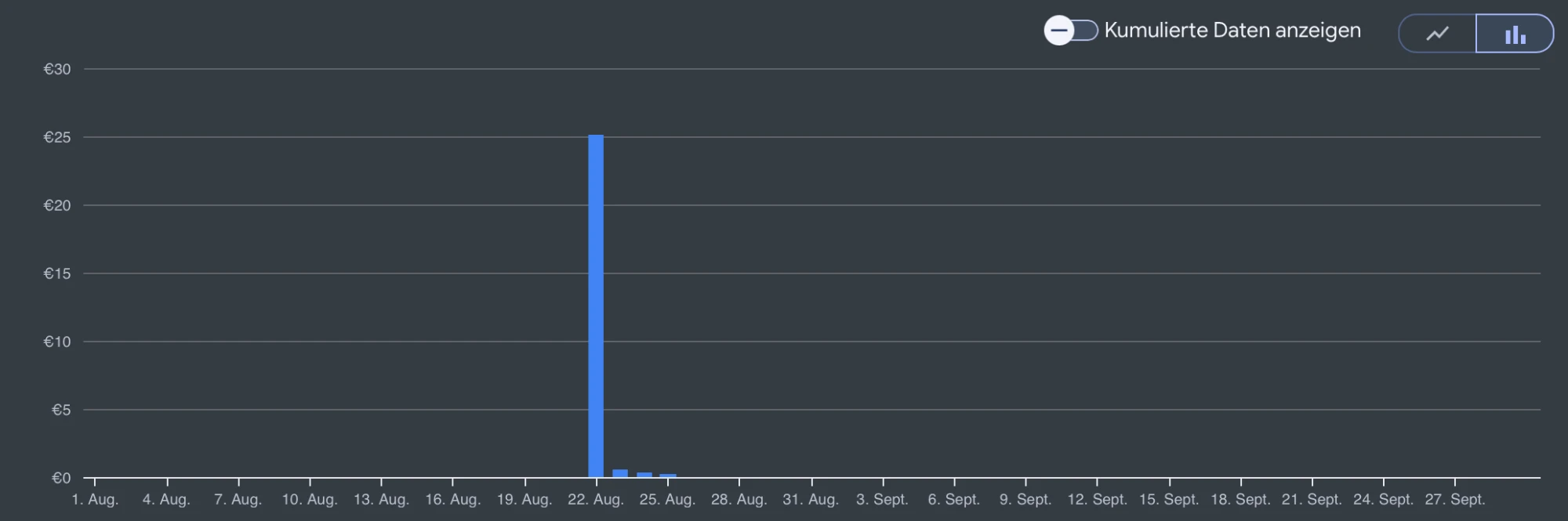
Where to look: in the Cloud Console under “Billing” → “Cost breakdown”. The top row is usage costs - the amount before any credit - followed by the offsetting rows for spending-based discounts (where the monthly free allowance lands) and the trial credit, with the total at the bottom. While the trial runs that total reads 0.00 even when there is an amount above it: the free allowance is applied first, then the trial credit. That makes the top row the interesting one - it shows what would actually be due once the trial is over. As long as it stays below the value of the free allowance (around $10 a month for translation), you pay nothing afterwards either. If it is regularly above, it is worth looking at what translates that much: every full scan across several target languages counts once in full, while day-to-day operation barely registers, because each text is translated once and then stored locally. From our own test installation: an entire month’s cost arose on four days during setup - and the whole following month added not a single further item. Even a tile with constantly changing content has only a limited vocabulary; once that is translated, the cache answers and nothing goes to Google any more.
As a safety net you can create a budget in Google Cloud with a spend cap and set it to 0 €. As soon as costs would actually arise, Google pauses usage instead of billing it. Google itself names two caveats: it is not a hard cap, and enforcement is not instantaneous, because cost reporting lags. A plain budget alert without a cap, by the way, limits nothing at all - it only sends emails.
And if Google does fail or pause: Simple Locale falls back to the free provider automatically. Your visitors still see translated text, just at somewhat lower quality - and anything already translated is stored locally and does not change.
Without warranty: this reflects what we knew in October 2026. Google can change its terms, its free allowances and the behaviour of its cost controls at any time. How you set up, monitor and safeguard your Google account is your responsibility alone - we give no assurance that no costs will arise, and accept no liability for costs incurred with Google.

The free provider (MyMemory) accepts at most 500 bytes of text per request - it deliberately rejects longer content instead of cutting it off incorrectly. In practice this mostly affects longer "Custom Texts" (e.g. a full HTMLBox widget with several paragraphs), less often short object names or captions.
If a provider with your own API key (Google Cloud Translate or DeepL, from the Standard edition) is also configured, Simple Locale automatically hands a text rejected by MyMemory over to it instead - neither has a comparable character limit. If only the free provider is available, that one cell simply stays untranslated (the tile shows the original text in the meantime, no crash) - the exact reason is logged in the instance's Symcon message log ("all providers in the chain ... rejected").
Yes, it can - with a bit of manual work. The source language isn't stored once for the whole installation, but per element - so you can absolutely have multiple original languages within the same installation.
If you currently have an unsorted mix, the easiest approach is: first run a full scan with your most-used language as the source language. Then manually delete every row whose content is actually written in a different language. Switch the source language to your second most-used language and run another scan - the objects you just deleted get automatically picked back up as new rows, this time captured correctly in the new language. Repeat for each further language until everything is covered.
By credit card via Stripe Checkout - a secure, PCI-compliant payment page hosted by Stripe. We never see or store your card details ourselves.
Fully automated, usually within a few minutes of successful payment: the license key and invoice (as a PDF) arrive directly by email.
Yes, no hassle at all: on our resend page, just enter the email address you ordered with - we'll email you all your existing license keys again. Then enter the key as usual in the module's configuration form and click "Activate license".
Reinstalling with the same, already-purchased key is completely normal and never blocked - each activation is only logged for abuse-detection purposes: which Symcon installation (via its configured licensee email) activated which key. That's purely to spot the same key being used in several installations at once (showing up under several different addresses) - a transfer you have told us about is perfectly fine - a normal reinstall on your own system doesn't trigger that.
The one exception: if your old key has already been traded in for an edition upgrade, it keeps working normally for a transition period and is given an expiry date - so the module shows it as a valid license with an end date, making it obvious that the newer key still needs to be entered. After that it has expired.
Simple: as a consumer, you have the legal right to withdraw from your purchase within 14 days, no reason needed. For digital license keys, we could ask you to waive that right in exchange for instant delivery - we deliberately don't, because we're confident Simple Locale is worth it. Just email us (see Imprint) and we'll sort it out without any fuss. You can find the full, formal withdrawal instructions here.
Not instantly. Whether your key is valid, Simple Locale checks entirely offline via a digital signature - no connection needed for that. Once a day, though, the module asks us whether the key is still active. After a withdrawal we mark it as deactivated in our system, and the module picks up the block at the next of those checks.
If your installation happens to be offline, the block accordingly only takes effect once it's back online and this daily check succeeds - a network failure there never blocks by mistake (the last known state is simply kept). Unlike an edition upgrade (see the documentation), this also doesn't start a fresh trial period - a withdrawn license stays blocked.
To a limited extent, yes: to translate, the text being translated is sent to the provider you've chosen (free via MyMemory, optionally Google Cloud Translate and/or DeepL, depending on your setup). That's necessary for translation to work at all.
When a license key is activated for the first time, a hash of the key (not the key itself) plus a licensee identifier is also reported to our own server - to spot the same key running in several installations at once. Passing a licence on or selling it is allowed - just tell us, and we will reassign the key to the new holder. After that, the module checks in with the same server once a day to see whether the license is still active (relevant e.g. after a revocation, see FAQ) - again only the key hash is transmitted, no other data. No tracking, no analytics, no advertising cookies. Switching between already-translated languages continues to run entirely locally, with no network delays - only this brief daily status check in the background needs a connection, and a network error during that check never locks anything out by mistake. The connection to our server is encrypted throughout (HTTPS). See our privacy policy for details.
In the other direction, on activation your installation fetches the icons and tile templates included in your edition - so a special edition actually looks the part, without a new module release every time. There may be several, and a later fetch picks up updates to them. The package carries the same signature scheme as a licence key, so your module accepts only what passes that check. It is stored locally: a design you have received stays with you even if we withdraw it later. The daily status check does not fetch it - only an activation, or an explicit click on „activate/update licence“, does.
Naturally it depends on the number of objects and languages - but we can confidently say: very little. As a reference point from our experience with real installations: >500 object names, >40 custom texts, and >200 captions across 7 languages together take up around 1.5 MB of instance configuration. Smaller/medium installations (a few dozen to a few hundred objects, 2-4 languages) typically stay well below that, in the low-to-mid double-digit KB range.
The cache adds barely anything on top: only the most recent translated value is stored per object and language, not its history - so even a weather tile whose values change every 10 minutes just overwrites the same storage slot each time instead of growing over time.
Depends on what's happening: switching languages between already-translated content runs entirely locally - no internet connection needed for that. Simple Locale does need internet whenever something is actually being translated for the first time: the initial tree scan, every (manual or automatic) rescan, and the automatic live re-translation whenever a tracked "custom text" changes externally. At those moments, the new/changed text is sent to your chosen translation provider - typically just a few kilobytes per operation, and text only - images or files from your visualisation are never transmitted. At licence activation, a small package travels the other way: the icons and tile templates of your edition, together typically a few kilobytes. After that they sit locally; only a further activation fetches updates. If the connection happens to be down at exactly that moment, only that one translation attempt fails (the tile shows the untranslated original text in the meantime instead of breaking) and is automatically retried on the next rescan or update.
Good news: 0. This matters because IP-Symcon licenses have a limit on "usable variables" - but Simple Locale itself doesn't create a single Symcon variable of its own. It only translates and rewrites the name and value of objects you've already created within your chosen root category (the module's own configuration lives as an instance property, not a variable). So Simple Locale doesn't count against your IP-Symcon license limit at all.
Some caution is needed here: when the language changes, Simple Locale rewrites exactly the object names within your root category. If your own script relies on one fixed name (e.g. a string comparison, or a trigger hanging off IPS_SetName), that very name change can unintentionally trigger your function or make it fail silently - Simple Locale doesn't know the purpose of your script and can't account for it. In that case you'd need to adapt your script for multi-language support yourself, e.g. by relying on the stable object ID instead of the (now language-dependent) name, or by recognizing and accepting every relevant translation of the name.
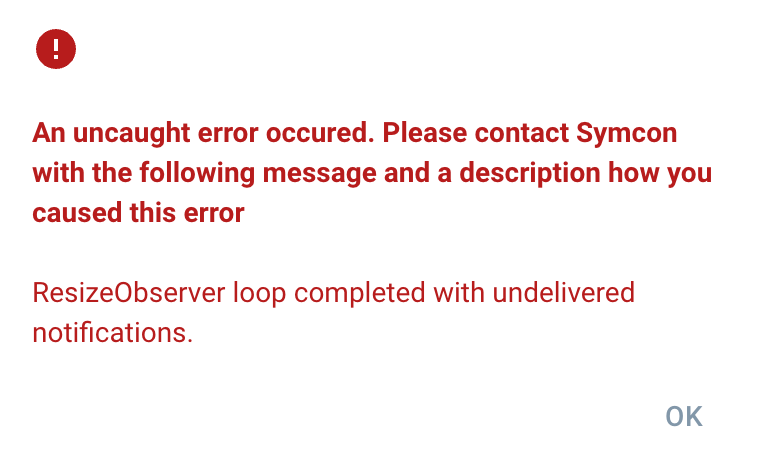
That message comes from the IP-Symcon console itself, not from Simple Locale. Behind it sits a well-known and harmless browser notice: the browser is reporting that a layout size calculation did not finish within a single frame. No data is lost, nothing gets translated incorrectly and your configuration is untouched - the console simply surfaces that notice as a red error dialog. Clicking "OK" is all it takes.
We reported this to IP-Symcon. Their reply (in German): "In der aktuellen 9.0 Beta soll dieser Fehler eigentlich korrigiert sein." - the issue is supposed to be fixed in the current 9.0 beta. So if you are still on an older version, the message can still appear - it goes away once you update to a version in which Symcon has fixed it.
Yes. If your module renders its own HTML tile via GetVisualizationTile(), its text can be translated live into whichever language the visualisation is currently showing - without an account of your own at a translation provider: SLOC_TranslateExternalText() uses the key of the Simple Locale instance already running on that system.
Call it defensively, because most users do not (yet) have Simple Locale installed: check function_exists("SLOC_TranslateExternalText") first, then look up the instance via IPS_GetInstanceListByModuleID("{1A2E3892-FE35-9E4E-A3A8-B983B0C41F64}") instead of hard-wiring an instance ID. If nothing turns up, return the text unchanged - no error, just no translation.
The best place to call it is inside every GetVisualizationTile(): the tile is re-rendered on every call anyway, so stale text cannot arise there in the first place. Names and values of the objects sitting in the visualisation are translated by Simple Locale itself regardless. The full example is in section 10 of the module documentation.
We're not issuing a separate Developer edition right now - the Pro edition already covers everything you need for integration. If you still think you have a special need, feel free to drop us a line.
Any software can have bugs - Simple Locale is thoroughly tested before every release, and we're not currently aware of any open ones. What does exist are deliberate limits of today's feature set (see "Known limitations" on the overview page) - those aren't bugs, they're design decisions.
If you still find something that doesn't work as described: we're genuinely grateful for the report and will do our best to ship a fix as quickly as possible. Just get in touch via Support with a short description of what you expected and what actually happened - the more specific, the faster we can help.
 Simple Locale